
Fluxus Executor APK [OFFICIAL] V2.703
Fluxus Executor is the #1 reliable script executor for Roblox on both PC and Android. Get the official, safe download, always updated for the latest Roblox patch. Stop risking your account with fake sites and download the safest, most powerful executor to enhance your favorite games.
What is Fluxus Executor and Why is it the Best?
Fluxus Executor helps you level up your game without the grind and acts as your secret weapon—a super reliable tool by which you inject and run custom Lua scripts right into your favorite games like Blox Fruits or Brookhaven, helping you automate farms, boost speed, or spawn resources with ease.
What makes Fluxus awesome! you can use it on your Windows or Android or even your Linux device. Just download the latest version, get your free key via Linkvertise, paste your script, and hit execute — no lag, no fuss. But remember, it skirts Roblox’s rules, so use it smartly to dodge bans.
Key Features That Make Fluxus #1
100% Free to Use
Fluxus Executor gives you full access to its powerful scripting engine with all its features for free without charging a penny. No matter if you use Fluxus apk or pc version, it is completely free, you just need to install,activate your key and start exploring limitless Roblox gameplay.
Safe & Secure Exploiting
Fluxus Executor ensures a safe and secure exploiting experience with advanced encryption, script verification, and sandbox protection. Its anti-ban and anti-detection systems minimize Roblox account risks when used responsibly. Regular updates keep Fluxus ahead of Roblox’s security patches, ensuring smooth and protected gameplay.
True Cross-Platform Sync
Fluxus is designed for flexibility — it runs flawlessly on PC, and Android. Whether you switch between mobile and desktop, your scripts, settings, and experience stay consistent. This cross-platform stability ensures a smooth gaming experience anywhere, so you never lose progress or performance quality while switching devices.
Instant ‘Patch Day’ Updates
Roblox updates can break most executors — but not Fluxus. The team behind Fluxus pushes updates within hours of Roblox patches, ensuring uninterrupted script execution. You won’t have to wait days for fixes or compatibility updates; Fluxus always keeps you up to date and ready to play without delay.
Zero-Lag Scripting Engine
Fluxus runs on a highly optimized Lua engine that minimizes lag and memory usage, even in heavy-scripted games. You’ll enjoy fast injection times, smooth performance, and zero crashes. This engine ensures scripts run seamlessly, giving you a lag-free experience even when executing complex or automation-heavy commands.
The “One-Click” Script Hub
No coding? No problem. Fluxus comes with a built-in Script Hub packed with tested and verified scripts for every type of Roblox game. Simply pick your favorite script, click once, and let Fluxus handle the rest. It’s the easiest way to enhance gameplay instantly without any technical steps.
Full Automation Control
Fluxus lets you automate almost any in-game task — from auto-farming and teleporting to collecting resources and boosting speed. This level of control helps players save time and focus on what matters: fun. You can even combine multiple scripts to create your own automated gameplay experience with ease.
Advanced Creator Studio (IDE)
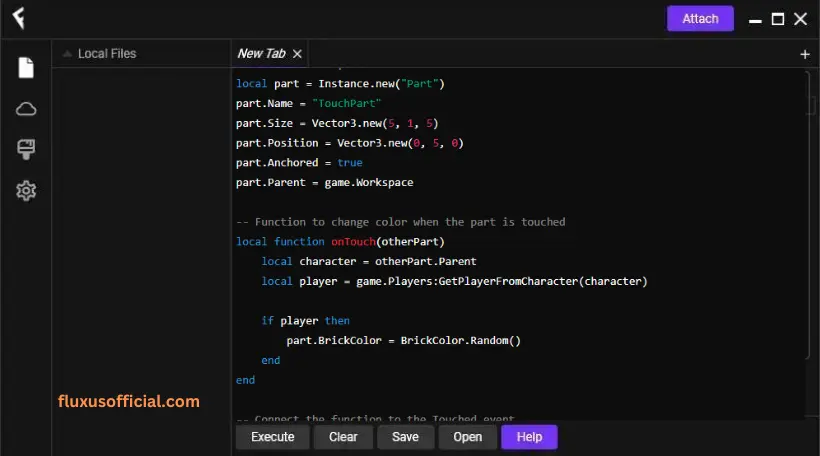
For developers and scripters, Fluxus offers a built-in Lua editor with syntax highlighting and live testing. You can write, debug, and modify your scripts all in one place. This advanced IDE is perfect for users who want full creative freedom to design or fine-tune custom Roblox scripts professionally.
High Script Compatibility (95%+ Games)
Fluxus supports nearly all Roblox games, giving players the flexibility to use their favorite scripts anywhere. Whether it’s adventure, simulator, or combat games, Fluxus executes scripts smoothly across 95%+ of Roblox titles. You’ll always have a consistent, reliable experience no matter what game you play.
How to Download & Install Fluxus in 3 Easy Steps
You can easily set up Fluxus Executor on your Android device, just follow the below steps.
You can install Fluxus on your PC in a quick and simple way, just follow the steps given above.
Why Do I Have to Disable My Antivirus? (An Honest Explanation)
Disabling your antivirus during installation might sound risky, but here’s the truth — Fluxus isn’t a virus. Most antivirus programs flag Roblox executors as threats because they modify game memory and inject scripts — behavior similar to hacking tools. This is called a false positive.
Fluxus uses encryption, custom DLLs, and injection methods that trigger antivirus alerts even though they’re safe when downloaded from the official Fluxus site. Once installed, you can re-enable your antivirus without any problem. Always avoid downloading Fluxus from unverified sources to stay 100% secure.

How to Get a Fluxus Executor Key
Fluxus uses a key system to unlock the executor. This key is free to generate but it only works for 24 hours. Once it expires, you’ll need to repeat the process to get a new one.
For users who don’t want to deal with the key system every day, Fluxus also offers a premium option that provides keyless access.
Follow these simple steps to get your Fluxus key:
Step-by-Step Guide
1. Open the Fluxus Executor
Start by launching the Fluxus Executor app on your device.
2. Tap the “Get Key” button
Inside the app, click or tap the Get Key option. When you do this, a special link will automatically be copied to your clipboard.
3. Paste the link in your browser
Open your browser (Chrome works best), paste the copied link into the search bar, and open it.
4. Complete the verification page
You will be redirected to a verification page where you may need to scroll down and choose the option that allows free access. Follow the instructions on the page until the destination unlocks.
5. Retrieve the Fluxus key
After completing the short verification steps, the page will display your Fluxus activation key.
6. Activate Fluxus
Copy the key, return to the Fluxus Executor app, paste the key into the key field, and confirm it.
Once the key is accepted, Fluxus Executor will be activated on your device for the next 24 hours, and you can start running scripts normally.
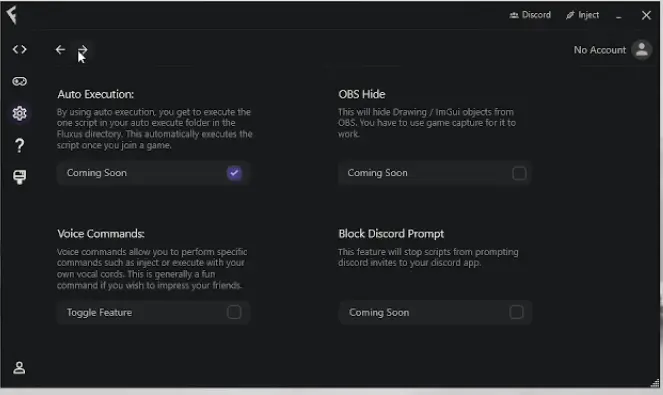
Screenshots From Fluxus


Fluxus Vs Other Executors
| Feature | Fluxus Z | Codex | Delta Executor |
|---|---|---|---|
| Reliability | Top-tier: Fast patches, stable | Okay: Some crashes | Great: Quick fixes |
| Performance | Stellar: Lag-free, mobile-ready | Fair: Loading issues | Strong: Fast, less mobile focus |
| Platforms | PC, Android, Linux (Wine) | Mostly PC | PC, Android, iOS (beta) |
| Security | Awesome: Anti-ban, safe downloads | Risky: Bans, scams reported | Good: Anti-ban |